Create, use maintain multiple currency and set rate of Exchange in Tally Prime. Step by step notes with example and practice assignment.
Multiple Currencies : Many Organizations have transactions in more than one currency. Such transactions have to be recorded either in the base (home) currency or in the foreign currency. If the transactions are recorded in home currency, the rate at which the foreign currency is exchanged should be recorded as well.
Create Currency in Tally Prime
Gateway of Tally > Currency > Create
| Symbol | Formal Name |
| $ | Dollar |
| Word representing number after decimal | Cent |
Set Rate of Exchange in Tally Prime
Set Dollar Rate : Create > Rate of Exchange
| Standard | Selling | Buying | |||
| Date | Specified Rate | Date | Specified Rate | Date | Specified Rate |
| 1-Apr-21 | ₹75/$ | 1-Apr-21 | ₹80/$ | 1-Apr-21 | ₹73/$ |
Create Ledger : Gateway of Tally > Create > Ledger
| Ledger Name | Under |
| Suresh Rawat | Sundry Creditors |
| Purchase | Purchase Accounts |
| Haider Enterprise | Sundry Debtors |
| Sales | Sales Account |
Create Stock Group : Gateway of Tally > Create > Stock Group
| Group | Under |
| Food | Primary |
Create Item : Gateway of Tally > Create > Stock Item
| Item | Under | Units |
| Pizza | Food | Pcs |
| Chips | Food | Pkt |
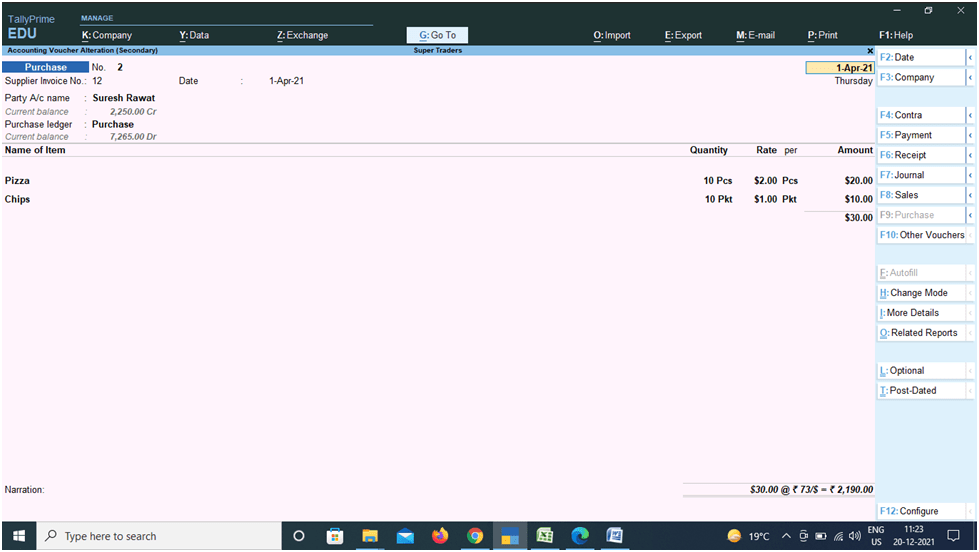
Purchase Entry Gateway of Tally > Voucher > F9
Supplier invoice no.: 001
Party A/c name ledger: Suresh Rawat
Purchase ledger: Purchase
| Name of Item | Quantity | Rate | Amount |
| Pizza | 10 Pcs | $2.00 Pcs | $20.00 |
| Chips | 10 Pkt | $1.00 Pkt | $10.00 |
| $30.00 @ ₹ 73/$ = ₹ 2190.00 |
Sales Entry : Gateway of Tally > Voucher > F8
Reference no.: 001
Party A/c name ledger: Haider Enterprise
Sales ledger: Sales
| Name of Item | Quantity | Rate | Amount |
| Pizza | 5 Pcs | $3.00 Pcs | $15.00 |
| Chips | 5 Pkt | $2.00 Pkt | $10.00 |
| $25.00 @ ₹ 80/$ = ₹ 2000.00 |

Thanks for study the Multiple Currency in Tally Prime Notes.